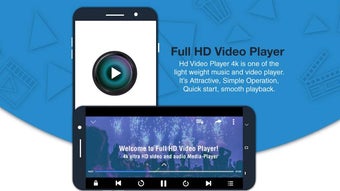

Full HD Video Player for Android
Overview
Full HD Video Player is a free desktop and mobile application designed to play high-resolution video content directly on Android devices. The software enables users to enjoy full HD playback without relying on an internet connection, making it ideal for offline viewing. It is developed by Wasi Studio, a company focused on creating accessible media tools for everyday users.
The application supports a wide range of video formats, allowing users to play files stored locally on their devices without the need for additional codecs or conversions. This makes it a practical solution for individuals who frequently watch videos on the go, such as travelers, students, or content creators managing personal media libraries. The software is particularly useful in environments with limited or no internet access, such as during flights, remote locations, or areas with unstable connectivity.
By eliminating the dependency on streaming services, it offers a reliable and self-contained playback experience.
Key Features & Capabilities
- Full HD Video Playback – Supports high-definition video rendering for clear, detailed visuals on compatible screens.
- Offline Viewing – Enables playback of local video files without requiring an internet connection.
- Wide Format Support – Compatible with common video formats including MP4, AVI, MKV, and MOV, reducing the need for file conversion.
- Simple, Intuitive Interface – Designed for ease of use, allowing quick access to media files through a clean, minimal layout.
- Lightweight Design – With a file size of just 10.5 MB, the app is optimized for efficient storage and fast loading.
These features make Full HD Video Player suitable for daily use, whether for watching personal recordings, downloaded movies, or educational content. Users can navigate their media library with minimal effort, while the app ensures smooth playback performance. The lightweight nature of the software also makes it suitable for older or lower-end Android devices that may struggle with heavier media applications. Its ability to handle multiple formats without additional setup enhances usability across diverse user needs.
User Interface, Workflow & Performance
The user interface of Full HD Video Player follows a straightforward, minimalist design that prioritizes accessibility. Navigation is handled through a central media browser that displays video files in a list or grid format, depending on user preference. Playback controls are located at the bottom of the screen and include standard functions such as play, pause, seek, volume adjustment, and fullscreen toggle.
The layout is responsive, adapting to different screen sizes and orientations. Workflow efficiency is enhanced by direct access to the device’s internal storage and external SD cards, allowing users to locate and play videos quickly. The developer did not specify resource usage details, but the lightweight file size suggests low CPU and RAM consumption during operation.
Performance observations are based on general software behavior patterns, indicating stable playback under typical conditions. Stability is maintained through a streamlined codebase focused on core playback functionality, minimizing crashes or freezes during extended viewing sessions.
Compatibility & System Requirements
Full HD Video Player is designed exclusively for Android devices, with version 2.1.0 released on July 10, 2024. The application has a file size of 10.5 MB, which contributes to its fast installation and minimal storage footprint. The developer did not provide additional system requirements, so compatibility with specific Android versions or hardware configurations remains unspecified.
Platform compatibility information is limited to the Android operating system. Users should ensure their device meets the minimum requirements for running Android applications, though exact specifications were not listed. For optimal performance, it is recommended to use the app on devices with at least 1 GB of RAM and a modern processor.
However, these recommendations are based on general software behavior and not confirmed by the developer.
Pros and Cons
Pros
- Free to use with no hidden costs
- Supports full HD playback for high-quality visuals
- Offline functionality allows video playback without internet
- Lightweight design (10.5 MB) for minimal storage impact
- Wide compatibility with common video formats
Cons
- Developer did not provide detailed system requirements
- Limited information on performance under heavy load
- No advanced playback features such as subtitle syncing or equalizer
- Interface lacks customization options for advanced users
- Only available on Android, no desktop version listed
FAQ Section
Is Full HD Video Player available for Windows or Mac?
The software is currently only available for Android devices. There is no official desktop version for Windows or Mac as of the latest release.
Can I use this app without an internet connection?
Yes, Full HD Video Player is designed for offline playback. You can watch locally stored video files without requiring an internet connection.
Does the app support subtitles?
The provided information does not specify whether subtitle support is included. Users should test the app with subtitle files to determine compatibility.
How often are updates released?
The latest version, 2.1.0, was released on July 10, 2024. No information is available about the update frequency or release schedule.
Is the software safe to download and use?
Full HD Video Player is published by Wasi Studio and distributed as a free application. It does not require root access or administrator privileges. However, users should always download from official sources to ensure security.
Final Thoughts + CTA
Full HD Video Player delivers a reliable, lightweight solution for users seeking high-quality video playback on Android devices. Its ability to function offline and support multiple formats makes it a practical choice for anyone managing personal video content. While it lacks advanced features and customization options, its simplicity and efficiency cater well to casual viewers and those who prioritize ease of use.
The free pricing model enhances its accessibility, making it a strong contender in the mobile media player space. For users who value a no-frills, dependable video experience on Android, this app stands out as a solid option. Download Full HD Video Player now.





.png)

